



😀 >>>1st post on the site<<< 😀
Hiya Nachos!
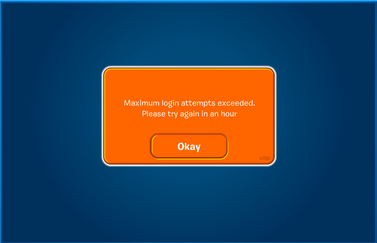
So lately we’ve all been having trouble with that pesky message from CP. If you don’t know what I’m talking about, here’s a picture:
😛
Here’s the deal. We’re gonna have to do this on Chrome (Sorry all you IE and Mozilla fans).
STEP ONE

Click the Chrome Menu button in the top right-hand corner.
STEP TWO
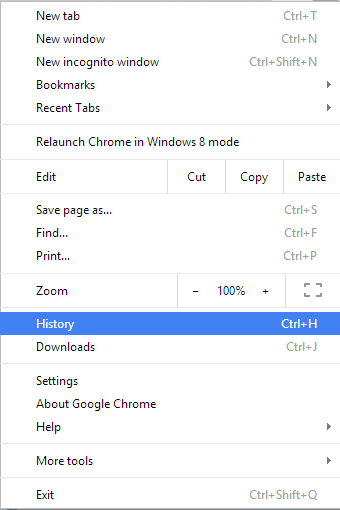
In the drop down menu, click the “history” button
STEP THREE

Click “Clear Browsing Data”
STEP FOUR
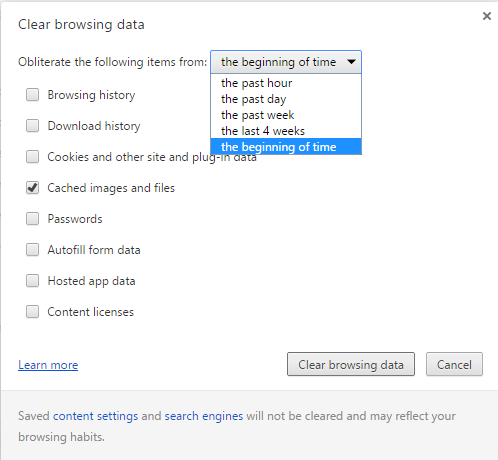
Uncheck everything except “Cached Images and Files”, click on the drop down box and select “The beginning of time”. Then click “Clear Browsing Data”
STEP FIVE
Reopen Chrome and you’re ready to go!
>>>Viva Los Nachos!<<<
Fluffy 9404
Nacho Army Temp. Owner
Filed under: The Nacho Army |





First Comment on my First Post
nice post bro 😛
I have Chrome YAY IM A TOTAL CHROME FAN LOLZ